ou find the app. You tap download. Then the store blocks you with that annoying message: “This app is not available in your country.”
It feels strange because the app may be all over YouTube, TikTok, Reddit, or a company website. But app stores don’t show the same apps to everyone. Google Play and Apple’s App Store use your account country, payment profile, developer settings, device type, and local rules to decide what you can download.
This guide explains how to fix an app not available in your country without jumping into shady APK sites or risky shortcuts. Some fixes take two minutes. Others depend on whether the app developer supports your region.
Why an App Says Not Available in Your Country
An app can be blocked by country for several reasons. Sometimes the developer hasn’t launched it in your region. Sometimes your store account still points to an old country. In other cases, the app needs local licenses, payment support, age ratings, or legal approval.
Google says Play country affects what apps, games, and content you see, and app availability can vary by country or region. Google also says country targeting is based on the user’s Play country, not the user’s current travel location.
Apple follows a similar account-based model. Apple says a customer’s Apple Account country or region decides which App Store they can buy from, and apps may be unavailable in some regions because of legal or regulatory requirements.
Common causes include:
- The app has not launched in your country.
- Your Google Play or Apple Account region is wrong.
- Your payment method doesn’t match the new region.
- The app is limited by law, licensing, or local compliance.
- Your device model, OS version, or processor isn’t supported.
- The app is in testing, staged rollout, or pre-registration.
- Store cache is showing old location data.
- The developer removed the app from your region.
App Not Available in Your Country: Quick Fix Table
| Problem | Best Fix | Works For |
|---|---|---|
| Wrong store country | Update Google Play or Apple Account country | Android, iPhone |
| Store showing old data | Clear cache, restart, sign in again | Android, iPhone |
| App not launched locally | Check developer website or wait | Android, iPhone |
| Region option missing | Check payment, family group, balance, subscriptions | Android, iPhone |
| Device not supported | Update OS or use a compatible device | Android, iPhone |
| Risky APK suggestion | Avoid unofficial downloads | Android mostly |
Top 10 Safe Ways to Fix an App Not Available in Your Country
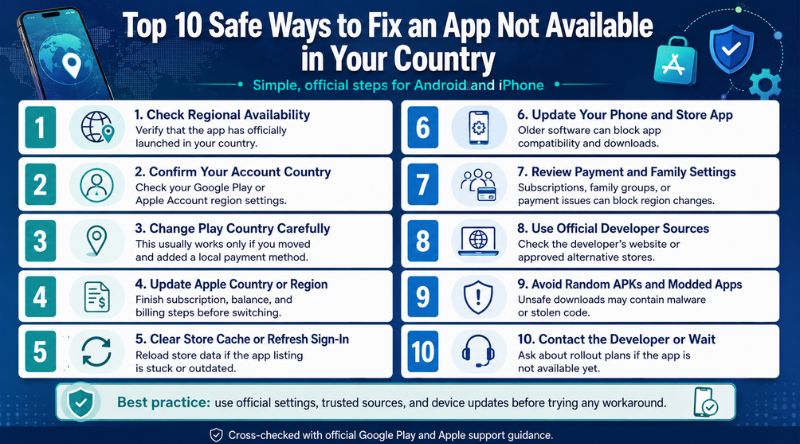
1. Check Whether the App Is Actually Available in Your Region
Start with the boring step first. It saves time.
Search the app’s official website, support page, launch announcement, or social media page. Many apps roll out country by country. Banking apps, streaming apps, AI tools, sports apps, shopping apps, and government apps often launch in limited markets first.
Don’t assume the app is available just because someone online has it. They may live in another country, use a different account region, or have access to beta testing.
| What to Check | Why It Matters |
| Official app page | Shows supported platforms and countries |
| App Store or Play Store link | Confirms whether your account can access it |
| Developer support page | May list rollout plans |
| Social updates | Useful for beta launches and country expansion |
A simple test helps: open the app link in a browser while signed out. Then open it again while signed in. If it appears signed out but disappears after sign-in, your store account country is likely the issue.
2. Confirm Your Google Play or Apple Account Country
Your phone’s physical location isn’t always enough. App stores care about your account region.
For Google Play, your Play country controls the store content you see. Google says you must be in the new country and have a payment method from that country to set up a new Play country.
For Apple, your Apple Account country decides the App Store region tied to your downloads and purchases. Apple also requires a valid payment method and billing address for the new country in many cases.
| Platform | Where to Check | Key Point |
| Android | Play Store > Settings > General > Account and device preferences | Look for Country and profiles |
| iPhone | Settings > Apple Account > Media & Purchases > View Account | Check Country/Region |
| Web | Google Pay or Apple account pages | Useful if phone settings don’t update |
This is one of the cleanest ways to fix an app not available in your country if you recently moved or created your account in another region.
3. Change Your Google Play Country Only If You Really Moved
On Android, changing your Play country can help. But don’t treat it like a quick toggle.
Google’s current help page says that after you first set your Google Play country, you must wait at least 90 days before changing it, and you must wait at least 90 days between later changes. It also notes that extra restrictions may apply.
To change your Google Play country:
- Open the Google Play Store.
- Tap your profile icon.
- Go to Settings.
- Tap General.
- Tap Account and device preferences.
- Open Country and profiles.
- Choose the new country if it appears.
- Add a payment method from that country.
- Wait up to 48 hours for the profile to update.
| Google Play Rule | What It Means |
| Must be in the new country | VPN alone usually won’t solve it |
| Needs local payment method | Card or billing profile must match |
| 90-day waiting period | You can’t switch often |
| Family group restriction | Members may not be able to change region |
| 48-hour update window | Changes may not appear instantly |
Only change your country if you live there or genuinely moved there. If you’re just traveling, this may cause more problems than it solves.
4. Change Your Apple Account Region the Right Way
On iPhone, you can change your Apple Account country or region from settings. But Apple blocks the change in some cases.
Apple says you should spend any Apple Account balance, cancel blocking subscriptions, wait for memberships or pre-orders to finish, and use a valid payment method for the new country or region before changing. Family Sharing can also block the switch.
To change Apple region on iPhone:
- Open Settings.
- Tap your name.
- Tap Media & Purchases.
- Tap View Account.
- Tap Country/Region.
- Tap Change Country or Region.
- Choose the new region.
- Agree to the terms.
- Add payment and billing details.
| Apple Requirement | What to Do |
| Active subscriptions | Cancel and wait until they end |
| Store credit | Spend balance first |
| Pre-orders or rentals | Wait until they complete |
| Family Sharing | Leave group if needed |
| Payment method | Add one accepted in the new country |
This can fix an app not available in your country when your Apple ID is tied to an old region.
5. Clear Store Cache and Refresh Your Account
Sometimes the app is available, but your store app is stuck with old data. This happens after travel, SIM changes, payment profile changes, or region updates.
On Android, clear the Google Play Store cache and data:
- Open Settings.
- Tap Apps.
- Choose Google Play Store.
- Tap Storage.
- Tap Clear cache.
- If needed, tap Clear data.
- Restart your phone.
- Open Play Store again.
Google notes that clearing Play Store cache and data may remove some settings, such as parental controls and password protection, and may ask you to accept the Terms of Service again.
| Action | Best Use |
| Clear cache | Quick refresh |
| Clear data | Deeper reset |
| Restart phone | Forces store reload |
| Sign out and back in | Refreshes account session |
| Wait 48 hours | Needed after country changes |
On iPhone, there is no direct App Store cache button like Android. Try signing out of Media & Purchases, restarting the phone, and signing in again.
6. Update Your Phone and the App Store
App availability errors don’t always mean country restriction. Sometimes the app doesn’t support your current OS version or device.
Update your device before changing account settings. Many apps require recent Android or iOS versions. Some also block older phones because of security, camera features, GPS support, banking rules, or performance limits.
| Device Issue | Fix |
| Old OS version | Update Android or iOS |
| Outdated Play Store | Update Google Play Store |
| Old App Store session | Restart and sign in again |
| Device not certified | Check Play Protect certification |
| Unsupported hardware | Try a newer compatible device |
Google Play Protect also lets you check whether a device is Play Protect certified through Play Store settings. Device certification problems can affect Play Store behavior and app access.
7. Check Payment, Balance, Subscriptions, and Family Settings
This step gets missed a lot. Store region changes often fail because of account baggage.
On Google Play, your balance stays linked to your old country. Google also says Play Points are linked to country, and changing countries can cause you to lose points and level progress.
On Apple, store credit, subscriptions, pre-orders, rentals, memberships, and Family Sharing can block country changes.
| Account Blocker | Platform | Fix |
| Store credit | Apple, Google Play | Spend or leave linked to old country |
| Active subscription | Apple, Google Play | Cancel or resubscribe in new region |
| Family group | Apple, Google Play | Leave group if needed |
| Payment mismatch | Apple, Google Play | Add local payment method |
| Recent country change | Google Play | Wait at least 90 days if required |
Before you try another fix, clean up these account issues. Otherwise, the store may keep rejecting the change.
8. Use the Developer’s Official Website or Approved Alternative Store
Some developers offer apps outside the main store. This can be safe if the source is official.
For Android, check the developer’s website first. Some companies offer direct APK downloads, Samsung Galaxy Store versions, Amazon Appstore versions, or enterprise download pages. Only use the source linked by the developer.
For iPhone and iPad, alternative app distribution depends on where you live. Apple says users in the European Union can install alternative app marketplaces and apps from developer websites, while users in Brazil and Japan have their own eligibility rules. Apple also says the Apple Account region and physical location must match the eligible region.
| Source | Safer When |
| Developer website | Link appears on official domain |
| Samsung Galaxy Store | App is from verified publisher |
| Amazon Appstore | App is listed by the real developer |
| iOS alternative marketplace | You live in an eligible Apple-supported region |
| Enterprise app portal | Your school, office, or service provider gave it |
This is a good way to fix an app not available in your country when the developer offers a legal regional download path.
9. Avoid Random APK Sites, Modded Apps, and “Unlocked” Versions
This is where people get burned.
A random APK can carry malware, spyware, adware, fake login screens, crypto drainers, or stolen code. “Modded” apps are worse because someone has changed the original file. That means you don’t really know what you’re installing.
Google Play Protect checks apps during installation and scans devices for harmful apps. Google says it may warn users, disable apps, remove harmful apps, or block unsafe URLs and apps.
Research on unwanted Android app distribution found that alternative markets and web downloads can carry higher risk than official stores, even though the Play Store is not perfect either.
| Risky Shortcut | Safer Choice |
| Mod APK | Don’t install |
| Cracked paid app | Avoid piracy and malware risk |
| Unknown Telegram file | Skip it |
| Fake Play Store clone | Use official store only |
| “Region unlocked” app | Check developer source first |
A free workaround isn’t free if it steals your account, photos, banking data, or business files.
10. Contact the Developer or Wait for Official Rollout
If nothing works, the app may simply not support your country yet.
Send a short support message. Include your country, device model, OS version, store account region, and screenshot of the error. Ask whether the app is planned for your region.
Developers can change country availability in Play Console and App Store Connect. Google lets developers add or remove countries for production releases, and Apple lets developers choose all countries or specific countries for App Store availability.
| What to Send | Example |
| Country | Bangladesh, India, USA, UK, etc. |
| Device | iPhone 14, Galaxy S23, Pixel 8 |
| OS version | iOS 18, Android 15, etc. |
| Error message | “Not available in your country” |
| Store account region | Current Apple ID or Play country |
This won’t always give an instant fix. But it gives you the cleanest answer. If enough users ask, the developer may expand availability.
How to Fix an App That Says Not Available in Your Country Without Breaking Things
The safest path is simple:
- Confirm the app’s supported countries.
- Check your store account country.
- Fix payment, balance, subscription, and family settings.
- Refresh the store cache.
- Update your device.
- Use only official developer links or approved alternative stores.
- Avoid modded APKs and fake app stores.
Don’t start with a VPN. A VPN may change your visible IP address, but it doesn’t always change your Apple Account region or Google Play country. Google’s developer guidance says Play country, not current travel location, is what country targeting uses for availability.
FAQs About App Not Available in Your Country
Why can I see the app on Google but not in the Play Store?
Search engines may index a global app page. But once you sign in, Google Play checks your account country, device compatibility, and developer availability settings. That’s why the app page may open in a browser but still block installation.
Can a VPN fix app not available in your country?
Sometimes it may change what a website shows, but it is not a reliable store fix. Google Play and Apple often use account country, billing profile, payment method, device eligibility, and region rules. Use official region settings instead.
Why is the Google Play country option missing?
Google says the option may not appear if you changed country recently, you aren’t located in the new country, or you’re part of a Google Family group. Extra restrictions may also apply.
Why can’t I change my Apple App Store country?
Apple may block the change if you have active subscriptions, remaining Apple Account balance, pending rentals, pre-orders, memberships, refunds, or Family Sharing restrictions.
Will I lose apps if I change my store country?
You may lose access to some apps, games, books, movies, TV shows, or subscriptions in the new country. Google clearly warns that content availability can change after switching countries.
Can I install an app from another country on iPhone?
It depends. Changing Apple Account region may work if you truly qualify for that region and have valid payment details. In some eligible regions, Apple also allows alternative app distribution, but the rules depend on both account region and physical location.
Is it safe to download an APK from the internet?
Only download from the developer’s official website or a trusted app marketplace. Avoid modded, cracked, or reuploaded APKs. Google Play Protect can scan unknown apps, but it’s still better to avoid risky sources in the first place.
Conclusion
The best way to solve app not available in your country is to check the real cause before changing anything. Start with the app’s official availability. Then review your Google Play or Apple Account country, payment method, subscriptions, family settings, device support, and store cache.
If the app still doesn’t appear, don’t rush into unsafe APKs or fake “unlocked” versions. Contact the developer, use official alternative stores where supported, or wait for the app to launch in your region.