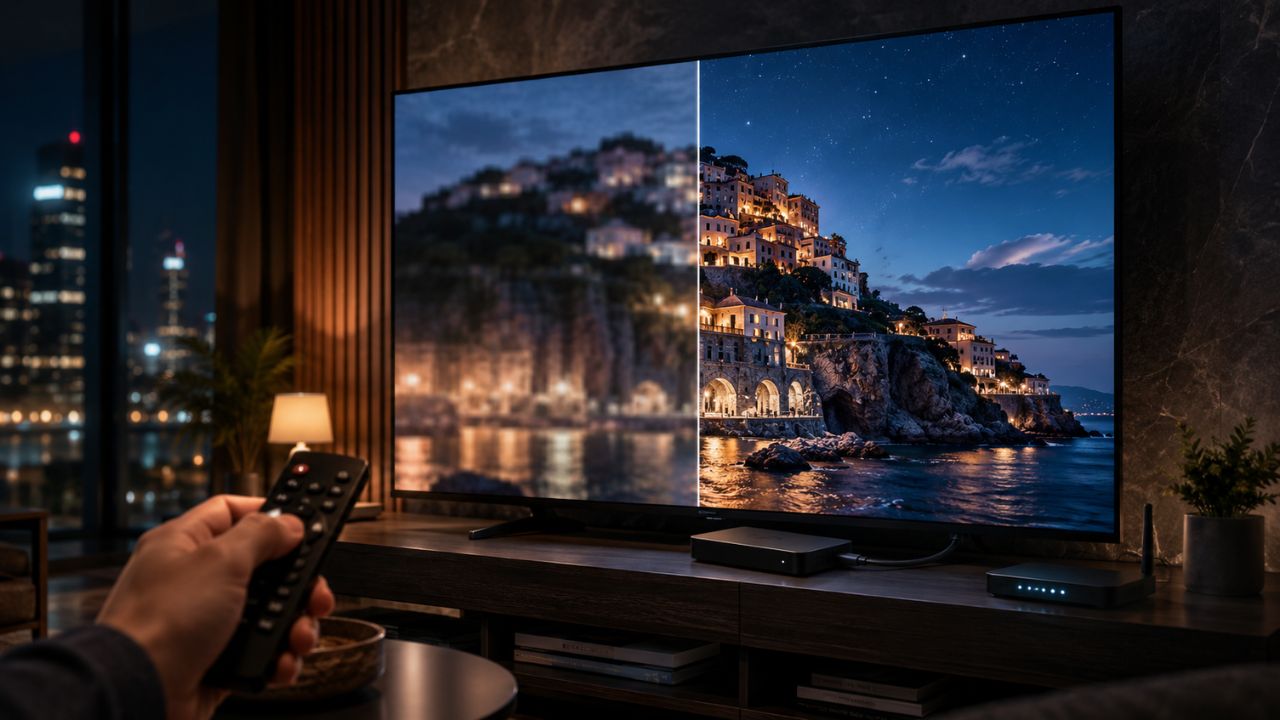
You pay for sharp streaming. You sit down to watch a big HBO Max movie. Then the picture looks soft, flat, and closer to 720p than 4K. It’s annoying because there’s no simple “4K” button inside the app.
That’s why this guide covers Max Streaming Stuck at 720p: How to Force 4K in a practical way. You can’t manually force resolution inside HBO Max like you can on YouTube. But you can force the app to choose 4K by fixing the plan, title, device, HDMI chain, display settings, and network speed.
The short answer is simple. HBO Max will only stream select titles in 4K UHD when your plan, device, TV, cable, HDMI port, and internet connection all qualify. If one part fails, the stream may drop to HD or look like 720p.
Why Max Gets Stuck at 720p
HBO Max uses adaptive streaming. That means the app checks your connection and playback setup, then picks the best quality it can safely play without constant buffering. You don’t get a manual video quality menu.
A 720p-looking stream usually comes from one of these problems:
- You’re not on the 4K-capable plan.
- The title isn’t available in 4K.
- Your device isn’t supported for 4K playback.
- Your HDMI cable or port fails HDCP 2.2.
- Your internet speed drops during playback.
- You’re watching in a browser instead of a supported 4K TV device.
- Your TV or streaming box output is set to 1080p.
- The app cache, device software, or network route is causing poor playback.
Think of 4K streaming as a full chain. Every link must work. If one link breaks, HBO Max may fall back to a lower stream.
Quick Overview: What You Need for 4K on HBO Max
| Requirement | What to Check | Why It Matters |
| Plan | Premium plan | Basic and Standard are not the main 4K plans |
| Title | 4K UHD, HDR10, or Dolby Vision badge | Not every movie or show has 4K |
| Device | Supported 4K TV, streaming stick, console, or box | Some devices only play HD |
| TV | 4K UHD TV with HDR support | A 1080p screen can’t show 4K |
| HDMI | HDMI 2.0 and HDCP 2.2 support | Bad ports or cables can block 4K |
| Internet | 25 Mbps minimum, 50+ Mbps better | Slow speeds trigger quality drops |
| App | Updated HBO Max app | Old apps can cause playback issues |
| Settings | 4K output, Auto Detect, Match Content | Wrong output settings can cap quality |
Max Streaming Stuck at 720p: How to Force 4K
Here’s the honest fix. You don’t force 4K with a hidden app setting. You force 4K by making HBO Max detect a clean 4K-ready setup.
Start with the plan and title. Then move to the device, HDMI chain, internet, and app health. Don’t waste time changing random TV picture modes before you confirm the basics.
Top 10 Fixes When Max Streaming Is Stuck at 720p
1. Check That You Have the Premium Plan
If your stream looks capped, check your plan first. HBO Max 4K UHD is tied to the Premium plan where available.
Open HBO Max, go to your profile, then check Subscription. If you’re on Basic with Ads or Standard, you should not expect regular 4K playback. Those plans are built around Full HD streaming, while Premium is the plan that includes 4K Ultra HD as available.
This is the most common reason people search for Max Streaming Stuck at 720p: How to Force 4K. They have a 4K TV and a fast connection, but the account plan blocks the higher stream.
| Check | What to Do |
| Account plan | Open Profile > Subscription |
| Needed for 4K | Premium plan |
| Common mistake | Assuming all ad-free plans include 4K |
| Best fix | Upgrade through HBO Max or your billing provider |
2. Make Sure the Title Is Actually Available in 4K
A 4K plan doesn’t make every title 4K. HBO Max only offers select shows and movies in 4K UHD, HDR10, or Dolby Vision.
Open the title details page before pressing play. Look for badges such as 4K UHD, HDR10, or Dolby Vision. If you don’t see them, the title may only be available in HD. Older shows, some documentaries, and many catalog titles may never stream in 4K.
Don’t judge the app from one title. Test a known 4K movie or a major recent HBO Max release. If that title plays sharply, your setup is probably fine.
| Check | What to Look For |
| Title page | 4K UHD, HDR10, Dolby Vision |
| No badge | Likely HD only |
| Best test | Try a newer premium movie |
| Key point | 4K depends on the title |
3. Use a Supported 4K Device Instead of a Browser
If you’re watching on a laptop browser, 4K is often the wrong expectation. HBO Max supports computer streaming, but its official 4K device list focuses on supported 4K TVs, streaming players, and consoles.
For the best shot at 4K, use a proper living-room device. Good options include Apple TV 4K, Fire TV 4K devices, Chromecast with Google TV, Roku 4K models, PlayStation 5, Xbox Series X|S, and supported 4K smart TVs from brands like LG, Samsung, Hisense, VIZIO, and Android TV makers.
This doesn’t mean browsers are useless. They’re fine for casual viewing. But if you want reliable 4K, move the stream to a supported 4K TV app or streaming box.
| Device Type | 4K Recommendation | |
| Laptop browser | Not ideal for 4K | |
| Smart TV app | Good if supported | |
| Apple TV 4K | Strong 4K option | |
| Fire TV/Roku/Chromecast 4K | Good if model supports 4K | |
| PS5/Xbox Series X | S | Good for supported playback |
4. Set Your Streaming Device Output to 4K
Sometimes HBO Max is ready for 4K, but your streaming box is set to 1080p. That caps the output before the app can show full quality.
On Apple TV 4K, check Settings > Video and Audio. Choose a 4K format, then turn on Match Dynamic Range and Match Frame Rate. On Roku, go to Settings > Display type and use Auto Detect. On Fire TV, go to Display & Sounds and set Video Resolution to Auto or a supported 4K mode.
On Android TV or Chromecast with Google TV, check Display & Sound. Make sure the device can output 4K and HDR. If the 4K option doesn’t appear, your HDMI port, cable, TV, or receiver may be blocking it.
| Platform | Setting to Check |
| Apple TV 4K | Format, Match Content, HDMI check |
| Roku | Display type > Auto Detect |
| Fire TV | Display & Sounds > Video Resolution |
| Android TV | Display & Sound > Resolution |
| Chromecast with Google TV | Advanced display settings |
5. Fix the HDMI Cable, Port, and HDCP 2.2 Chain
This is where many 4K problems hide. Your TV may be 4K. Your streaming stick may be 4K. But if the HDMI port, cable, receiver, switch, or soundbar doesn’t support the right copy-protection standard, the stream can drop.
HBO Max says the full connected chain needs HDMI 2.0 and HDCP 2.2 support. That includes the TV, streaming player, AV receiver, HDMI switch, adapters, and cables.
Try this simple test. Plug your streaming device directly into a known 4K/HDCP 2.2 HDMI port on the TV. Skip the receiver or soundbar for now. If 4K works directly, the problem is somewhere in the middle of the chain.
| HDMI Issue | Fix |
| Old HDMI cable | Use a High-Speed 4K HDMI cable |
| Wrong HDMI port | Use the TV’s HDCP 2.2-compatible port |
| Receiver blocks 4K | Connect streamer directly to TV |
| HDMI switch issue | Remove switch for testing |
| Adapter problem | Avoid cheap adapters |
6. Test Internet Speed on the Streaming Device
A speed test on your phone doesn’t always prove your TV has a strong connection. Your TV may sit far from the router. It may use a weaker Wi-Fi chip. It may be stuck on a crowded 2.4 GHz band.
Run a speed test as close to the streaming device as possible. HBO Max lists 25 Mbps or higher for 4K, with 50+ Mbps recommended. In real homes, the higher number matters because other devices also use bandwidth.
For stable 4K, use Ethernet if possible. If you use Wi-Fi, choose 5 GHz or Wi-Fi 6/6E when available. Move the router away from walls, metal shelves, and microwave ovens.
| Speed Result | What It Means |
| Under 25 Mbps | 4K may fail |
| 25–50 Mbps | Can work, but drops may happen |
| 50+ Mbps | Better for stable 4K |
| Strong speed on phone only | Test near the TV too |
| Frequent dips | Use Ethernet or improve Wi-Fi |
7. Restart the App, Device, and Router
This sounds basic, but it works more often than people admit. Streaming apps can get stuck on a poor-quality stream after a network dip.
Close HBO Max fully. Don’t just press Home. Force quit the app if your device allows it. Then restart the streaming device and router. Open HBO Max again and test a 4K-labeled title.
If you’re using a smart TV, unplug it from power for 60 seconds. Many TVs don’t fully restart when you press the power button on the remote. A full power cycle clears temporary app and network issues.
| Restart Step | Why It Helps |
| Force close app | Clears stuck playback session |
| Restart streamer | Refreshes device output |
| Restart router | Fixes local network issues |
| Unplug TV | Clears smart TV memory |
| Test again | Confirms if quality improves |
8. Update the HBO Max App and Device Software
Old app builds can cause login bugs, playback errors, and poor streaming behavior. The same goes for outdated TV firmware or streaming device software.
Go to your device’s app store and check for HBO Max updates. Then check system updates for your TV, Roku, Fire TV, Apple TV, Android TV, PlayStation, or Xbox. Restart after updating.
If the app still looks bad, uninstall and reinstall it. This clears damaged app data and forces a clean version of the app.
| Update Area | Action |
| HBO Max app | Update from app store |
| TV firmware | Check system settings |
| Streaming box OS | Install latest update |
| Console software | Update before testing |
| App reinstall | Use if cache seems broken |
9. Turn Off VPNs, Proxies, and Unstable Network Tools
VPNs can help with privacy, but they can also slow streaming or route your traffic through a crowded server. That can make HBO Max choose a lower-quality stream.
Turn off your VPN and test again. Also disable proxy tools, custom DNS experiments, or privacy filters that may interfere with streaming. You’re not trying to change your whole network. You’re only testing whether the route is causing the 720p-looking stream.
If the picture improves without the VPN, use a faster server or stream without it.
| Network Tool | What to Try |
| VPN | Turn off for testing |
| Proxy | Disable temporarily |
| Custom DNS | Test default DNS |
| Privacy router filters | Pause and retest |
| Result improves | Network route was likely the issue |
10. Reduce Bandwidth Use in the House
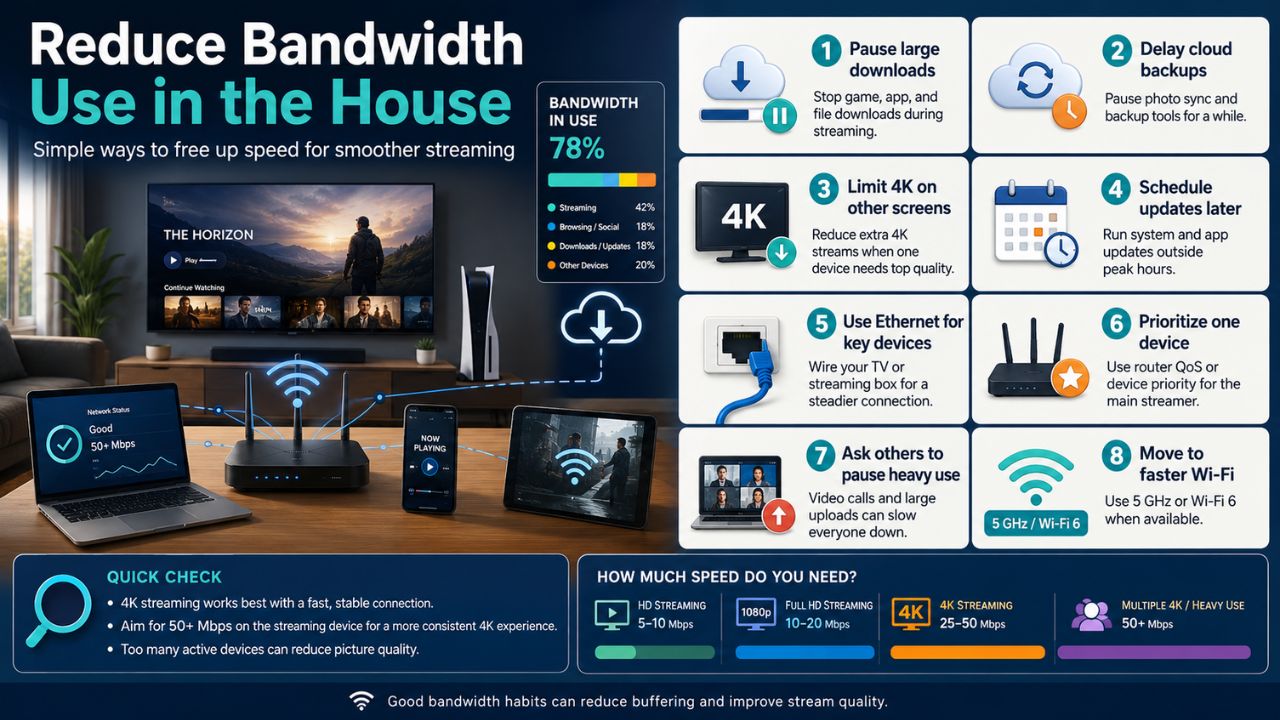
4K streaming needs room to breathe. If someone is downloading games, backing up photos, joining video calls, or streaming on multiple devices, HBO Max may lower quality.
Pause big downloads. Stop cloud backups for the test. Ask other users to pause heavy streaming for a few minutes. Then replay the 4K title.
Also check account streams. Premium allows more simultaneous streaming than lower plans, but overloaded home bandwidth can still hurt quality. A fast internet plan doesn’t always mean every device gets fast speed at the same time.
| Bandwidth Drain | Fix |
| Game downloads | Pause during playback |
| Cloud backup | Schedule later |
| Multiple 4K streams | Reduce active streams |
| Video calls | Test after calls end |
| Weak Wi-Fi | Use Ethernet |
Best Troubleshooting Order
Don’t jump around randomly. Use this order:
- Confirm Premium plan.
- Pick a title with a 4K UHD badge.
- Use a supported 4K TV app or streaming device.
- Set device output to 4K/Auto.
- Check HDMI 2.0 and HDCP 2.2.
- Test internet speed near the streaming device.
- Restart app, device, TV, and router.
- Update or reinstall HBO Max.
- Disable VPN or proxy tools.
- Test again on a different 4K device.
This order saves time. It starts with the things that fully block 4K, then moves to things that make 4K unstable.
What “Force 4K” Really Means on HBO Max
This is the part many guides skip. You can’t force 4K inside HBO Max with a normal setting. HBO Max automatically adjusts video quality based on your plan, device, title, and connection.
So when someone asks Max Streaming Stuck at 720p: How to Force 4K, the real answer is this: remove every reason HBO Max has to downgrade the stream. Once the app sees a Premium plan, 4K title, supported device, valid HDMI chain, and fast connection, it should choose the highest available quality on its own.
Avoid shady browser extensions that claim to unlock 4K. They may not bypass platform limits, and they can create privacy or account risks. Use official device support instead.
Common Signs Your Setup Is Not Getting 4K
A soft picture does not always mean 720p, but these signs point to a quality problem:
- Fine details look blurry on a 4K TV.
- Text, credits, and background edges look soft.
- Dark scenes show heavy blocking.
- HDR or Dolby Vision mode does not trigger on your TV.
- Your streaming device reports 1080p output.
- The title has a 4K badge, but the TV never switches into HDR.
- The picture improves when you switch to another streaming device.
Use your TV’s info button if it has one. Some TVs show current input resolution or HDR status. Streaming apps don’t always show the active resolution, so the TV or receiver info screen can help.
FAQs About Max Streaming Stuck at 720p
Can I manually select 4K inside HBO Max?
No. HBO Max does not currently offer a manual resolution selector. The app chooses quality automatically based on your plan, device, title, and connection.
Why does HBO Max look 720p on my 4K TV?
Your TV may be 4K, but the stream can still fall back because of your plan, title, device, HDMI port, cable, receiver, Wi-Fi speed, or app issue.
Does HBO Max support 4K in Chrome or Firefox?
For reliable 4K, use an officially supported 4K TV device or smart TV app. Browser playback is not the best route for 4K streaming on HBO Max.
Why do I see Dolby Vision but not 4K?
Dolby Vision is an HDR format, not a resolution label by itself. Your TV may trigger HDR, but the actual stream quality still depends on bandwidth, title, and device support.
Can a bad HDMI cable really limit HBO Max to HD?
Yes. If the HDMI cable, port, receiver, or switch fails the required 4K/HDCP path, streaming services may fall back to lower quality.
Does live sports stream in 4K on HBO Max?
Don’t assume every live sports event is 4K. Sports quality depends on the event, plan, device, region, and broadcast format.
Will upgrading internet always fix 720p quality?
Not always. Faster internet helps only if speed is the problem. If your plan, title, device, or HDMI chain doesn’t support 4K, more speed won’t fix it.
Is 50 Mbps enough for HBO Max 4K?
Yes, 50+ Mbps is a strong target for stable 4K. You may need more if your household has many active devices.
Should I use Ethernet instead of Wi-Fi?
Yes, if possible. Ethernet gives a more stable connection and reduces sudden quality drops during 4K playback.
Why does one HBO Max title look sharp and another looks soft?
Not all titles are mastered or offered in the same quality. A newer 4K movie may look much sharper than an older HD catalog show.
Conclusion
Fixing Max Streaming Stuck at 720p: How to Force 4K starts with the truth: HBO Max doesn’t give you a manual 4K switch. The app picks the highest quality it can deliver.
So build the right setup. Use the Premium plan. Choose a 4K-labeled title. Watch on a supported 4K device. Set output to 4K. Check HDMI 2.0 and HDCP 2.2. Use a stable 50+ Mbps connection when possible. Then restart, update, and test again.
If 4K still won’t play, try a different supported streaming device before blaming your TV. Most 720p-looking HBO Max problems come from one weak link in the chain, not from the screen itself.